• Skip to main content
  • About us
  • Amazonas 320 Aquarium LED Lighting
  • Amazonas 500 Aquarium LED Lighting
  • Amazonas 80 Aquarium LED Lighting
  • Amazonas 960 iCon Aquarium LED Lighting
  • Atlantik Compact Planted
  • Atlantik Compact WiFi
  • Atlantik iCon Compact – Reef Aquarium LED Lighting
  • Atlantik iCon Installation Guide and Apps Manual
  • Atlantik iCon LED PCB Upgrade
  • Atlantik iCon Operation Manual
  • Atlantik iCon Reef Aquarium LED Lighting
  • Atlantik iCon Upgrade
  • Atlantik LED Light Gallery
  • Atlantik P300 V4 Plus Reef Aquarium LED Lighting
  • Atlantik Pendant 300
    • Atlantik P300 Tech Specs
  • Atlantik Pendant V3 – WiFi LED Reef Aquarium Light
  • Atlantik Pendant WiFi
  • Atlantik Pendant WiFi Planted Aquarium
  • Atlantik Upgrade Kit
  • Atlantik V2.1 Planted
  • Atlantik V3 WiFi LED Reef Aquarium Light
    • Atlantik V3 Spectrum and PAR TEST
    • Atlantik V3 Tech Specs
  • Atlantik V4 Compact Reef Aquarium LED Lighting
  • Atlantik V4 planted freshwater Aquariums LED Light
  • Atlantik V4 Reef Aquarium LED lighting
  • Aura Mounting Arms
  • Azurelite (Blue) & UV LED Flashlights
  • Azurelite blue LED Flashlight
  • Buy Orphek Aquarium LED lighting
  • Coral Gallery Under Reef Aquarium LED
  • Disclaimer
  • Gateway2
  • Introducing the Orphek iCon App!
  • Kaspian LED pendant
  • Natura iCon Reef Aquarium LED Light
  • Ocean Reef Aquarium LED lighting
  • Omini Magnetic Lens Kit – 77mm
  • OR Bar Freshwater Planted LED Light
  • OR3 150 / 120 / 90 / 60 Reef Bar LED Light
  • OR3 Hybrid Reef Aquarium LED Lighting Bars
  • OR3 LED Bar Reef Aquarium Photo Gallery
  • OR3 LED Grow Light LED Bar
  • OR3 Reef Aquarium LED Bar
  • OR4 LED PCB Upgrade Kit
  • Orphek Atlantik Compact V3 Plus Internet of Things Aquarium LED Lighting
  • Orphek Atlantik P300 V3 Plus
  • Orphek Atlantik V3 Plus Internet of Things (IoT) Reef Aquarium LED Lighting
  • Orphek Coral Lens Kit – 37mm
  • Orphek Extra Wide Coral Lens Kit – 52mm
  • Orphek iCon App Manual
  • Orphek Master Gateway
  • Orphek Mounting Solutions
  • Orphek OR4 iCon Sun & Moon Sync Reef & Freshwater Aquarium LED Bars Series
  • Orphek Reef Aquarium LED Lighting Products
  • Orphek Warranty
  • Osix – OR3 & OR4 LED Bar iCon Smart dim controller
  • Osix Operational Manual And Technical Information
  • PR72 PLANTED
  • PR72 Reef
  • Privacy Policies
  • Public Aquarium Zoo LED Lighting Photo Gallery
  • Reef Aquarium LED Light Photos gallery 2025
    • Loveland Living Planet Aquarium Public Aquarium by Orphek LED Lighting
  • Refund policy
  • Retailers & Online Stores
  • Shipping policies
  • Simple Setting – Customize your programs effortlessly
  • Slim Line 24″ LED Lighting
  • Sun & Moon Synchronizer iCon App features
  • Support
  • ToS
  • Universal Fixing Bracket Kit
  • Universal Mounting Arm, Fixing Bracket & Mounting Arm Extension 3 in 1 Kit
  • Warranty
  • More about Orphek Aquarium LED Lighting
    • Orphek LED Review
      • 48 inches REEF TANK IN FLORIDA
      • Another happy Orphek Atlantik owner
      • ATLANTIK LIGHTS FRENCH CLIENT REEF AQUARIUM | ORPHEK REVIEW
      • ATLANTIK OWNER SHOWS OFF HIS NEW ATLANTIKS
      • Atlantik par reading by clients
      • Atlantik review by Reef Builders | ORPHEK LED REVIEW
      • ATLANTIKS LED ARRIVE IN the UK
      • CUSTOMER REVIEWS HIS NEW ATLANTIKS
      • CUSTOMERS FIRE BACK TO ORPHEK
      • LED LIGHTS REVIEW BY CUSTOMER | ORPHEK LED REVIEW
      • LEDS SPECIFICALLY FOR GROWING CORALS | ORPHEK REVIEW
      • Orphek Atlantik led review by Mauro From Australia | ORPHEK LED REVIEW
      • Why did you choose Orphek ? | ORPHEK LED REVIEW
    • About Corals
    • Aquarium LED Lighting
    • KELVIN LUX LUMENS PAR PUR
    • LED For Aquarium – LED emitter revolution for reef aquarium
    • Orphek LED Lighting for Public Aquariums and Venues
    • LED PAR Test
    • LED vs Metal Halide
    • PAR-Aquarium LED lighting
  • Legal
  • Atlantik Manual Section 1
  • Atlantik Manual Section 2
  • Atlantik Manual Section 3
  • Atlantik Manual Section 4
  • Atlantik Manual section 5
  • Atlantik V2.1 WiFi
    • Atlantik V2.1 Tech Specs
    • Downloads
  • Bar Reef LED Lights
  • Clients Reviews
  • Contacting Orphek
  • Helix 3000 Skimmer
  • Helix 5000 Skimmer
  • NR 12 Planted Tank LED Lamp
  • NR 12 Reef
  • Planted Aquarium LED Products
  • Portfolio
  • Sitemap

Orphek Reef Aquarium LED Lighting

Reef Aquarium LED Lighting

  • About us
  • Amazonas 320 Aquarium LED Lighting
  • Amazonas 500 Aquarium LED Lighting
  • Amazonas 80 Aquarium LED Lighting
  • Amazonas 960 iCon Aquarium LED Lighting
  • Atlantik Compact Planted
  • Atlantik Compact WiFi
  • Atlantik iCon Compact – Reef Aquarium LED Lighting
  • Atlantik iCon Installation Guide and Apps Manual
  • Atlantik iCon LED PCB Upgrade
  • Atlantik iCon Operation Manual
  • Atlantik iCon Reef Aquarium LED Lighting
  • Atlantik iCon Upgrade
  • Atlantik LED Light Gallery
  • Atlantik P300 V4 Plus Reef Aquarium LED Lighting
  • Atlantik Pendant 300
    • Atlantik P300 Tech Specs
  • Atlantik Pendant V3 – WiFi LED Reef Aquarium Light
  • Atlantik Pendant WiFi
  • Atlantik Pendant WiFi Planted Aquarium
  • Atlantik Upgrade Kit
  • Atlantik V2.1 Planted
  • Atlantik V3 WiFi LED Reef Aquarium Light
    • Atlantik V3 Spectrum and PAR TEST
    • Atlantik V3 Tech Specs
  • Atlantik V4 Compact Reef Aquarium LED Lighting
  • Atlantik V4 planted freshwater Aquariums LED Light
  • Atlantik V4 Reef Aquarium LED lighting
  • Aura Mounting Arms
  • Azurelite (Blue) & UV LED Flashlights
  • Azurelite blue LED Flashlight
  • Buy Orphek Aquarium LED lighting
  • Coral Gallery Under Reef Aquarium LED
  • Disclaimer
  • Gateway2
  • Introducing the Orphek iCon App!
  • Kaspian LED pendant
  • Natura iCon Reef Aquarium LED Light
  • Ocean Reef Aquarium LED lighting
  • Omini Magnetic Lens Kit – 77mm
  • OR Bar Freshwater Planted LED Light
  • OR3 150 / 120 / 90 / 60 Reef Bar LED Light
  • OR3 Hybrid Reef Aquarium LED Lighting Bars
  • OR3 LED Bar Reef Aquarium Photo Gallery
  • OR3 LED Grow Light LED Bar
  • OR3 Reef Aquarium LED Bar
  • OR4 LED PCB Upgrade Kit
  • Orphek Atlantik Compact V3 Plus Internet of Things Aquarium LED Lighting
  • Orphek Atlantik P300 V3 Plus
  • Orphek Atlantik V3 Plus Internet of Things (IoT) Reef Aquarium LED Lighting
  • Orphek Coral Lens Kit – 37mm
  • Orphek Extra Wide Coral Lens Kit – 52mm
  • Orphek iCon App Manual
  • Orphek Master Gateway
  • Orphek Mounting Solutions
  • Orphek OR4 iCon Sun & Moon Sync Reef & Freshwater Aquarium LED Bars Series
  • Orphek Reef Aquarium LED Lighting Products
  • Orphek Warranty
  • Osix – OR3 & OR4 LED Bar iCon Smart dim controller
  • Osix Operational Manual And Technical Information
  • PR72 PLANTED
  • PR72 Reef
  • Privacy Policies
  • Public Aquarium Zoo LED Lighting Photo Gallery
  • Reef Aquarium LED Light Photos gallery 2025
    • Loveland Living Planet Aquarium Public Aquarium by Orphek LED Lighting
  • Refund policy
  • Retailers & Online Stores
  • Shipping policies
  • Simple Setting – Customize your programs effortlessly
  • Slim Line 24″ LED Lighting
  • Sun & Moon Synchronizer iCon App features
  • Support
  • ToS
  • Universal Fixing Bracket Kit
  • Universal Mounting Arm, Fixing Bracket & Mounting Arm Extension 3 in 1 Kit
  • Warranty
  • More about Orphek Aquarium LED Lighting
    • Orphek LED Review
      • 48 inches REEF TANK IN FLORIDA
      • Another happy Orphek Atlantik owner
      • ATLANTIK LIGHTS FRENCH CLIENT REEF AQUARIUM | ORPHEK REVIEW
      • ATLANTIK OWNER SHOWS OFF HIS NEW ATLANTIKS
      • Atlantik par reading by clients
      • Atlantik review by Reef Builders | ORPHEK LED REVIEW
      • ATLANTIKS LED ARRIVE IN the UK
      • CUSTOMER REVIEWS HIS NEW ATLANTIKS
      • CUSTOMERS FIRE BACK TO ORPHEK
      • LED LIGHTS REVIEW BY CUSTOMER | ORPHEK LED REVIEW
      • LEDS SPECIFICALLY FOR GROWING CORALS | ORPHEK REVIEW
      • Orphek Atlantik led review by Mauro From Australia | ORPHEK LED REVIEW
      • Why did you choose Orphek ? | ORPHEK LED REVIEW
    • About Corals
    • Aquarium LED Lighting
    • KELVIN LUX LUMENS PAR PUR
    • LED For Aquarium – LED emitter revolution for reef aquarium
    • Orphek LED Lighting for Public Aquariums and Venues
    • LED PAR Test
    • LED vs Metal Halide
    • PAR-Aquarium LED lighting
  • Legal
  • Atlantik Manual Section 1
  • Atlantik Manual Section 2
  • Atlantik Manual Section 3
  • Atlantik Manual Section 4
  • Atlantik Manual section 5
  • Atlantik V2.1 WiFi
    • Atlantik V2.1 Tech Specs
    • Downloads
  • Bar Reef LED Lights
  • Clients Reviews
  • Contacting Orphek
  • Helix 3000 Skimmer
  • Helix 5000 Skimmer
  • NR 12 Planted Tank LED Lamp
  • NR 12 Reef
  • Planted Aquarium LED Products
  • Portfolio
  • Sitemap
You are here: Home / The secret of Orphek Sun & Moon Synchronizer iCon feature

July 3, 2024

The secret of Orphek Sun & Moon Synchronizer iCon feature

Orphek introduces a new iCon feature – The Sun & Moon Synchronization program – and becomes the only brand capable of mimicking Nature at its fullest!
sun_moon_sync_orphek_ icon_app

The Sun & Moon Synchronization! Mimicking Nature at its fullest!

Pursuing new challenges, Orphek has developed the only technology in the market that can reproduce Nature at its fullest, elevating your aquatic experience to unprecedented levels! 

This is a extraordinary new feature for Sun and Moon cycles enabling the synchronization of both cycles with the real local timing throughout the year, reproducing Nature at its fullest and bringing you a revolutionary authenticity never reached before by any other brand! 

Beyond Mimicking Nature

Besides mimicking Nature at its fullest like nobody else can, Orphek has taken a leap to the future and develop and App that does it ALL automatically for you!

This feature synchronizes automatically with the time on your cell phone, requiring no additional action from you.

Additionally, the light intensity adjusts dynamically based on HELIUS data, enhancing user’s experience and environmental responsiveness.

The Sun Moon Sync feature is designed to align with the sunrise, sunset, moonrise, and moonset times of your local or selected location. This feature also takes the moon cycle into account, automatically obtaining and updating these times to ensure accuracy and convenience.

Updating Orphek App:

If you have Orphek App already installed in your device, ensure it is updated to the latest version of the Orphek App.

Note: You can enable the Auto Upgrade feature, so the light will be automatically updated. However, some important updates will still require your confirmation to proceed.

Device Update: when there is a new update available, the App will display a message in a pop-up window – NEW UPDATES.

  1. Click on (UPDATE NOW.)
  2. Once the updated in conclude do the NET PARING process again by pressing the reset button 4 times.

Learn how to use Sun & Moon Synchronizer

Sun & Moon Synchronizer is the latest and most advanced technology introduced by Orphek

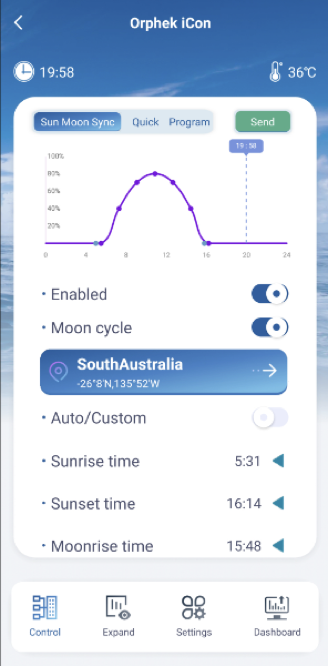
Upon initial entry into the application, users are introduced to the Sun & Moon Synchronizer feature (button on the left side up – Sun Moon Sync), which operates on default settings !

This mean that you not need to do any program the light is already sync with your local sun and moon,

When navigating from the Dashboard, users will notice the Sun Moon Sync button illuminated in blue, indicating its activation.

Additionally, the light intensity adjusts dynamically based on HELIUS Program, enhancing user experience and environmental responsiveness. The included graph provides a visual representation of how light intensity varies throughout the day.

Two cyan markers on the time axis indicate the start and end of the moon cycle, providing clear reference points for users.


Adjusting the Sun Sync Time !

For example : If the sun sync begins around 5 AM and you wish for the light to start at 9 AM while still maintaining synchronization, you can easily make this adjustment. Simply change the light clock to 4 hours later. This way, the system will still sync with your local sunrise, sunset, moonrise, and moonset times, but the light will start at your preferred time of 9 AM.

Time Setting Options:

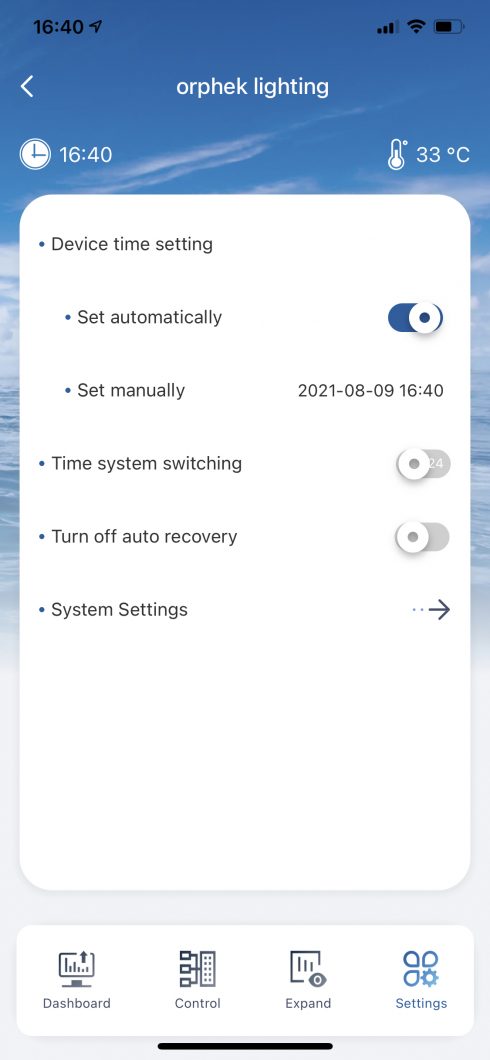
Press the Settings button in the bottom menu.

  • Automatic Time Setting: Access the settings and slide the button to the right to enable automatic time setting. Alternatively, disable this function to manually set the time.
  • Time Format Adjustment: Modify the time format by toggling the switch button for the time system.
time setting

Location Selection and Configuration:

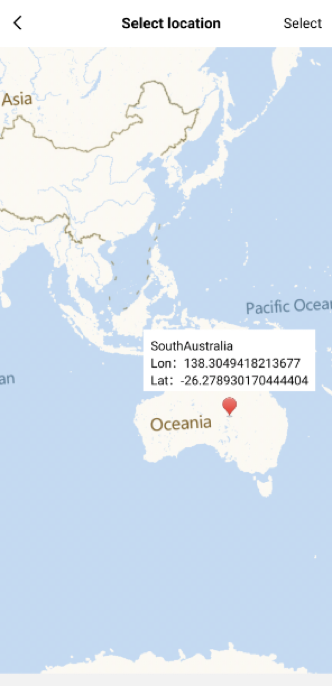
To specify your desired location, click to access the map interface, where you can pinpoint the desired place. After selecting the location, click the (SELECT) button to confirm your choice. If sunrise and sunset times cannot be retrieved for the chosen region, a notification will prompt you to select an alternative location, ensuring accurate data retrieval.

Managing Solar & Lunar Sync Settings:

To deactivate the Sun & Moon Synchronizer feature, move the (ENABLE) button to the off position and click the (SEND) button to apply the changes.

To adjust the time settings, switch the mode from (AUTO) to (CUSTOM) by moving the respective button. Select the desired time point by clicking the side-facing arrow icon, then confirm your selection with the downward-facing arrow icon.

Once all adjustments are made, click the (SEND) button to implement the updated settings.
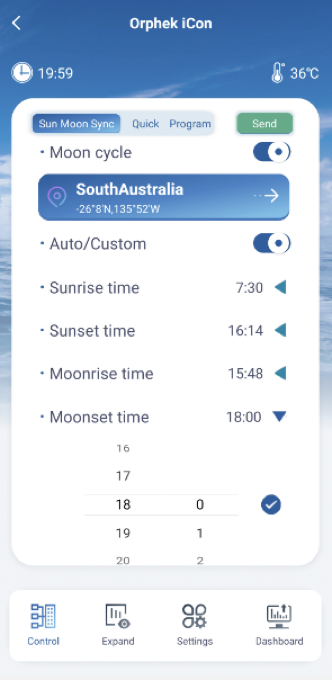

In Group mode (if you have multiple lights and create a group), the Sun & Moon Synchronizer feature operates differently. It only functions in custom mode, with the default time set to 0. You need to set the sunrise, sunset, moonrise, and moonset times in advance. The graph will update accordingly.
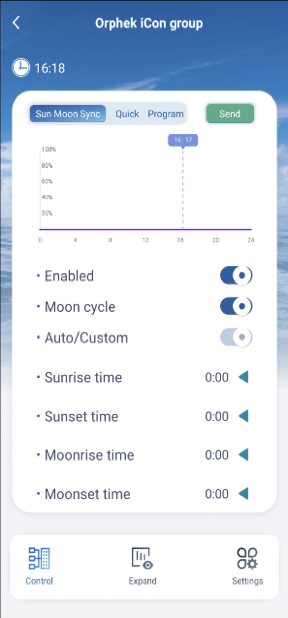
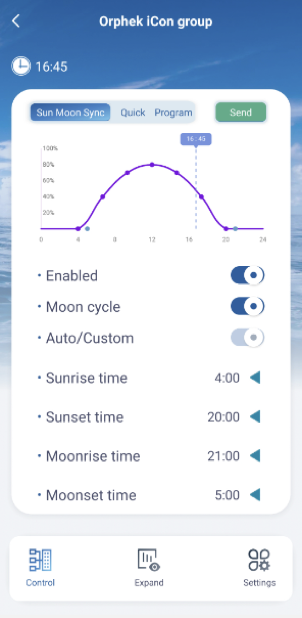
Important Note: Any changes or operations performed on the Sun & Moon Synchronizer feature require clicking the (SEND) button for them to take effect. Failure to do so will result in the light not executing the new changes or operations, and the modifications will not be saved.

Moon Cycle Activation and Functionality (LUNAR SCREEN):

By moving the (MOON CYCLE) button to the on position, the moon mode will operate during moonrise and moonset times. During this period, the Lunar function within the Expand section will activate automatically, with the start and end times determined by the moonrise and moonset times, respectively.

Note: In this case, you are not allowed to set the start and end times manually.
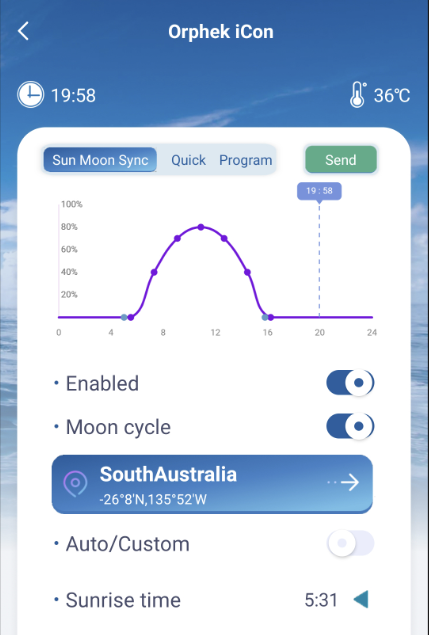
If you have previously set the start and end times in Lunar, you will observe that these times are automatically adjusted when you access the Lunar feature.

However, when you deactivate the Sun Moon Sync feature and initiate the Program to run, the Lunar start and end times will revert to the previously set times. This occurs because the Lunar function operates under the Program setting, leading to the reversion of time settings.
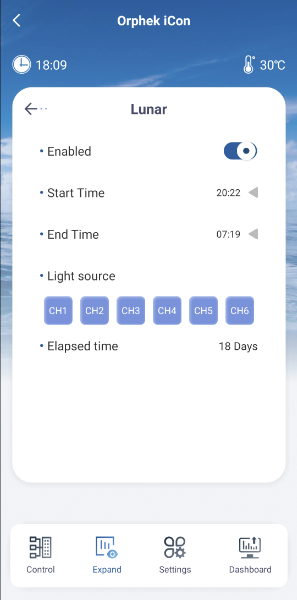
In Moon Cycle mode, the light intensity adjusts according to the calendar date, simulating the phases of the moon. The Elapsed Time indicator displays the current calendar date.
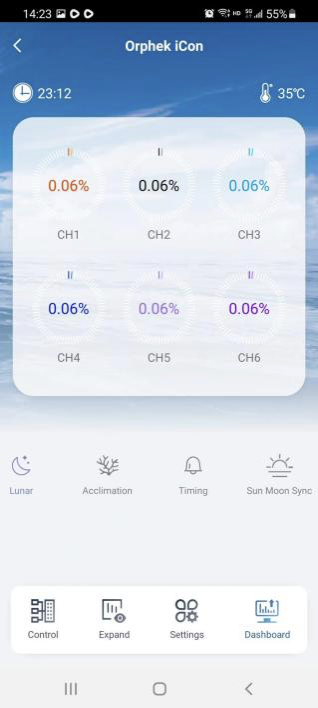
For instance, if today is the first day of the month, the Elapsed Time indicator will display “1 day” and the light intensity will operate at 0.067%. By the fifteenth day, corresponding to the full moon phase, the Elapsed Time will show “15 days” and the light intensity will increase to 1%.

The light intensity increases by 0.067% daily from the first to the fifteenth day, and then decreases by 0.067% each day thereafter until it reaches 0% on the thirtieth day.

Whether the Solar & Lunar Synchronizer feature or the Program mode is active, when it is moon time, the lunar icon on the Dashboard will illuminate in blue, indicating that the moon mode is operational.
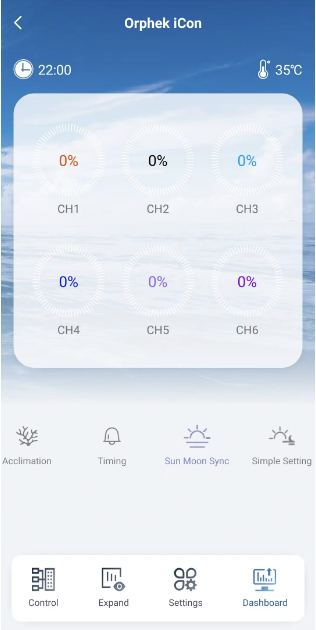
If the Sun Moon Sync is active and the sunrise and sunset times encompass the moonrise and moonset times, resulting in no lunar presence, all channels on the Dashboard will display 0%.

Copyright 2009-2019 Orphek Aquarium LED lighting© 2026

This website uses cookies to improve your experience. We'll assume you're ok with this, but you can opt-out if you wish. Cookie settingsACCEPT
Privacy & Cookies Policy

Privacy Overview

This website uses cookies to improve your experience while you navigate through the website. Out of these cookies, the cookies that are categorized as necessary are stored on your browser as they are as essential for the working of basic functionalities of the website. We also use third-party cookies that help us analyze and understand how you use this website. These cookies will be stored in your browser only with your consent. You also have the option to opt-out of these cookies. But opting out of some of these cookies may have an effect on your browsing experience.
Necessary
Always Enabled
Necessary cookies are absolutely essential for the website to function properly. This category only includes cookies that ensures basic functionalities and security features of the website. These cookies do not store any personal information.
SAVE & ACCEPT